How to Configure HAProxy for Wazuh Manager Load Balancing (with HTTPS HAProxy Helper)
A complete guide on configuring HAProxy as a load balancer for a Wazuh cluster, including Dataplane API setup and HTTPS HAProxy Helper integration for high availability.

In enterprise security operations, high availability and scalability are fundamental requirements to ensure operational continuity and efficient log analysis. Wazuh, an open-source security monitoring and threat detection platform, is widely deployed to safeguard critical infrastructure. However, as log volume and environment complexity scale, distributing workload across multiple server nodes becomes essential.
That is where HAProxy comes in—a reliable, high-performance load balancer. In this article, you will learn how to configure HAProxy to balance agent traffic across a multi-node Wazuh cluster while maintaining resilience, scalability, and high availability.
Setup and Architecture
For this demonstration, we use the following setup:
- 1 Amazon Linux Server dedicated to the Load Balancer (HAProxy)
- 1 Wazuh Indexer 4.10
- 1 Wazuh Dashboard 4.10
- 3-Node Wazuh Manager Cluster (1 Master, 2 Workers) running version 4.10
- 3 Linux Endpoints with Wazuh Agent 4.10 installed
The resulting architecture is structured as follows:
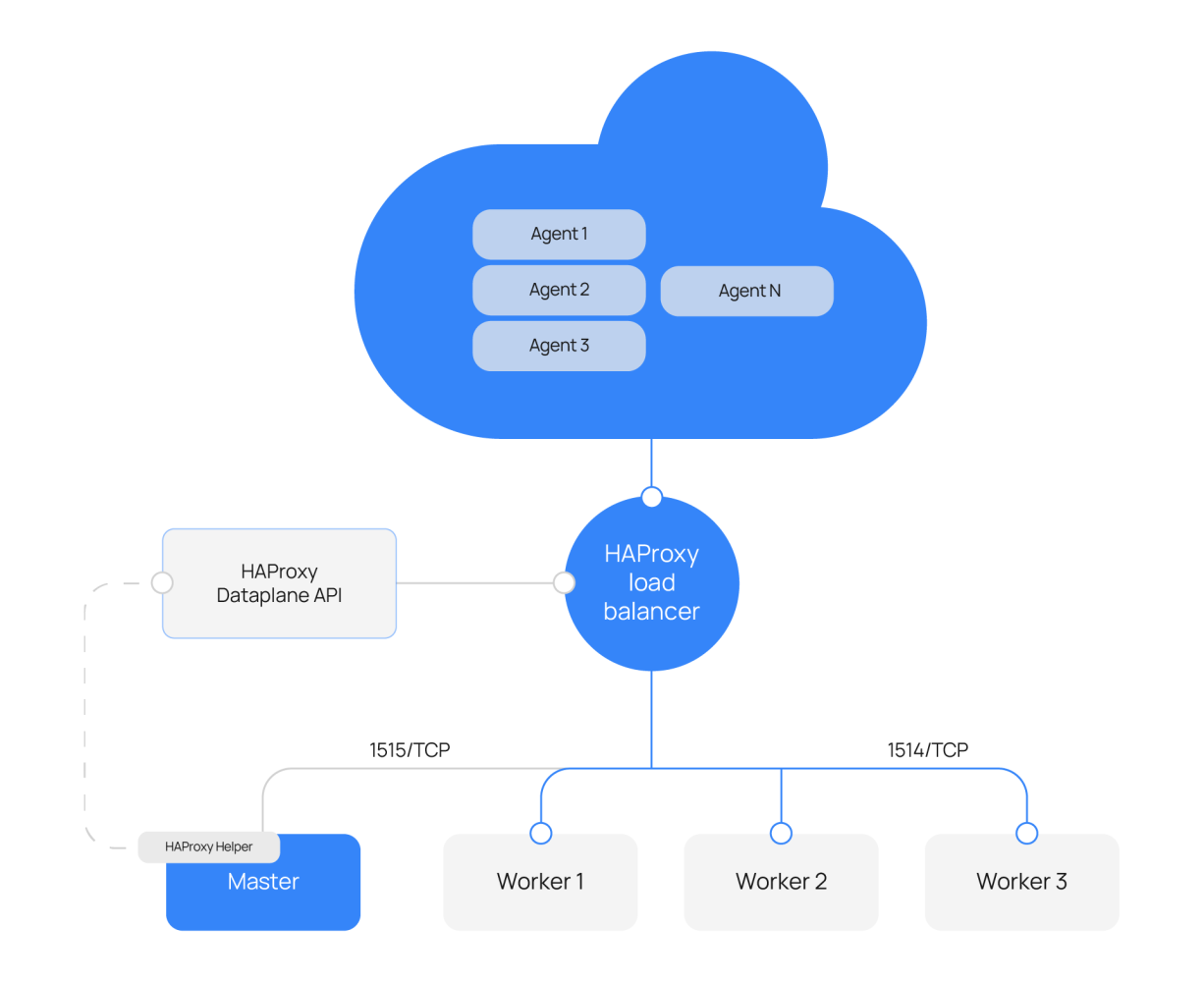 Wazuh Cluster Architecture with HAProxy Load Balancer
HAProxy Installation and Configuration
HAProxy can be installed via package managers, Docker containers, or third-party repositories. For Amazon Linux, we install it directly using dnf.
All commands in this guide are executed with
rootprivileges.
1. Installation and Service Enablement
Install HAProxy:
1
dnf install haproxy -y
Verify the installed version:
1
haproxy -v
Enable the service at system boot:
1
systemctl enable haproxy
2. Configuring haproxy.cfg
Edit or create /etc/haproxy/haproxy.cfg:
1
nano /etc/haproxy/haproxy.cfg
Populate the configuration file with the following directives:
1
2
3
4
5
6
7
8
9
10
11
12
13
14
15
16
17
18
19
20
21
22
23
24
25
26
27
28
29
30
31
32
33
34
35
36
37
38
39
40
41
42
43
44
45
46
47
global
  chroot /var/lib/haproxy
  user haproxy
  group haproxy
  maxconn 4000
  pidfile /var/run/haproxy.pid
  stats socket /var/lib/haproxy/stats level admin
  hard-stop-after 30016
  log 127.0.0.1 local2 info

defaults unnamed_defaults_1
  mode http
  maxconn 4000
  log global
  option tcplog
  option redispatch
  option dontlognull
  timeout check 10s
  timeout connect 10s
  timeout client 1m
  timeout queue 1m
  timeout server 1m
  retries 3

frontend wazuh_register from unnamed_defaults_1
  mode tcp
  bind :1515
  default_backend wazuh_register

frontend wazuh_reporting_front
  mode tcp
  bind :1514 name wazuh_reporting_front_bind
  default_backend wazuh_reporting

backend wazuh_register from unnamed_defaults_1
  mode tcp
  balance leastconn
  server master <MASTER_MANAGER_IP>:1515 check
  server worker1 <WORKER_1_MANAGER_IP>:1515 check
  server worker2 <WORKER_2_MANAGER_IP>:1515 check

backend wazuh_reporting
  mode tcp
  balance leastconn
  server master <MASTER_MANAGER_IP>:1514 check
  server worker1 <WORKER_1_MANAGER_IP>:1514 check
  server worker2 <WORKER_2_MANAGER_IP>:1514 check
The
<MASTER_MANAGER_IP>and<WORKER_X_MANAGER_IP>placeholders can be configured using IP addresses or FQDNs.
Important: For the HAProxy Helper to properly manage backend node states in Wazuh, the load balancing algorithm must be set to
leastconn.
Configuring HAProxy Helper with HTTPS
The HAProxy Helper relies on the HAProxy Data Plane API to dynamically update backend configurations and node statuses between the Wazuh Master node and HAProxy.
⚠️ Security Warning: The default
dataplaneapi.ymlexample uses placeholder credentials (user: wazuh,password: wazuh) andinsecure: true. Never use default or weak credentials in production environments. Generate strong, cryptographically secure secrets, restrict API network access, and enforce strict TLS certificate validation.
1. Generating TLS Certificates
Generate the self-signed certificate on the HAProxy Load Balancer server:
1
2
3
openssl req -x509 -newkey rsa:4096 -keyout lb-key.pem -out lb-cert.pem -sha256 -nodes \
  -addext "subjectAltName=IP:<LOAD_BALANCER_IP>" \
  -subj "/C=US/ST=State/O=Wazuh/CN=LoadBalancer-Internal"
(Replace <LOAD_BALANCER_IP> with your load balancer server IP).
Next, generate the client certificate on the Wazuh Master Manager:
1
2
3
openssl req -x509 -newkey rsa:4096 -keyout lb-key.pem -out lb-cert.pem -sha256 -nodes \
  -addext "subjectAltName=IP:<MASTER_MANAGER_IP>" \
  -subj "/C=US/ST=State/O=Wazuh/CN=Manager-Internal"
(Replace <MASTER_MANAGER_IP> with your Wazuh Master server IP).
2. Dataplane API Download and Configuration
Download and install the Data Plane API binary:
1
curl -sL https://github.com/haproxytech/dataplaneapi/releases/download/v2.8.13/dataplaneapi_2.8.13_linux_x86_64.tar.gz | tar xz && cp dataplaneapi /usr/local/bin/
Create /etc/haproxy/dataplaneapi.yml:
1
2
3
4
5
6
7
8
9
10
11
12
13
14
15
16
17
18
19
20
21
22
23
24
25
26
27
28
29
30
config_version: 2
name: haproxy
mode: single
status: ""
dataplaneapi:
  host: 0.0.0.0
  port: 5555
  advertised:
    api_address: ""
    api_port: 0
  tls:
    tls_port: 6443
    tls_certificate: /etc/haproxy/ssl/lb-cert.pem    # Path to your SSL certificate
    tls_key: /etc/haproxy/ssl/lb-key.pem            # Path to your private key
  scheme:
  - https
  transaction:
    transaction_dir: /tmp/haproxy
  user:
  - name: wazuh
    insecure: true
    password: wazuh
haproxy:
  config_file: /etc/haproxy/haproxy.cfg
  haproxy_bin: /usr/sbin/haproxy
  reload:
    reload_delay: 5
    reload_cmd: service haproxy reload
    restart_cmd: service haproxy restart
    reload_strategy: custom
Adjust
tls_certificate,tls_key, and the API credentials (nameandpassword) to match your secure deployment parameters.
3. Service Execution and API Validation
Restart HAProxy:
1
systemctl restart haproxy.service
Run Data Plane API in the background:
1
/usr/local/bin/dataplaneapi -f /etc/haproxy/dataplaneapi.yml &
Test API connectivity:
1
curl -k -X GET --user wazuh:wazuh https://localhost:6443/v2/info
Configuring the Wazuh Master Manager
On the Wazuh Master Manager node, edit /var/ossec/etc/ossec.conf and append the <haproxy_helper> block inside <cluster>:
1
2
3
4
5
6
7
8
9
10
11
12
13
14
15
16
17
18
19
20
21
22
23
<cluster>
   <name>wazuh</name>
   <node_name>wazuh-master</node_name>
   <node_type>master</node_type>
   <key>658e2ed0095b0121f95d2e4c7ccc616d</key>
   <port>1516</port>
   <bind_addr>0.0.0.0</bind_addr>
   <nodes>
       <node>172.31.50.173</node>
   </nodes>
   <hidden>no</hidden>
   <disabled>no</disabled>
   <haproxy_helper>
       <haproxy_disabled>no</haproxy_disabled>
       <haproxy_address>172.31.61.73</haproxy_address>
       <haproxy_user>wazuh</haproxy_user>
       <haproxy_password>wazuh</haproxy_password>
       <haproxy_protocol>https</haproxy_protocol>
       <haproxy_port>6443</haproxy_port>
       <haproxy_cert>/var/ossec/etc/lb-cert.pem</haproxy_cert>
       <client_cert_key>/var/ossec/etc/manager/lb-cert-manager.pem</client_cert_key>
   </haproxy_helper>
</cluster>
Configuration Breakdown:
<haproxy_address>: IP address of the HAProxy Load Balancer server.<haproxy_user>/<haproxy_password>: Credentials matching Data Plane API configuration.<haproxy_cert>: Load Balancer certificate copied to the Wazuh Manager.<client_cert_key>: Key/certificate generated on the Wazuh Master Manager.
Restart the Wazuh Manager service to apply changes:
1
systemctl restart wazuh-manager
Verifying Integration Logs
Inspect cluster log files on the Master node to verify Helper communication:
1
tail -n500 /var/ossec/logs/cluster.log | grep 'HAPHelper'
 Cluster logs confirming successful HAPHelper communication with HAProxy Data Plane API
Bonus: Systemd Service for Data Plane API Autostart
To ensure Data Plane API starts automatically upon server reboots:
- Create
/etc/systemd/system/dataplaneapi.service:1
sudo nano /etc/systemd/system/dataplaneapi.service - Add the following unit configuration:
1
2
3
4
5
6
7
8
9
10
11
12
13
[Unit]
Description=HAProxy Data Plane API
After=network.target

[Service]
Type=simple
User=root
ExecStart=/usr/local/bin/dataplaneapi -f /etc/haproxy/dataplaneapi.yml
Restart=always
RestartSec=5

[Install]
WantedBy=multi-user.target
- Reload systemd and enable the service:
1
2
3
sudo systemctl daemon-reload
sudo systemctl enable dataplaneapi
sudo systemctl start dataplaneapi
- Verify service status:
1
sudo systemctl status dataplaneapi
Conclusion
Configuring HAProxy for load balancing in a Wazuh cluster—along with HTTPS-enabled HAProxy Helper—delivers a resilient, scalable, and manageable security infrastructure. Integrating the Data Plane API with Wazuh Manager enables dynamic backend node management without disrupting log collection or agent reporting.
Feel free to share feedback or reach out on LinkedIn and GitHub with any questions regarding Wazuh architecture or load balancing.